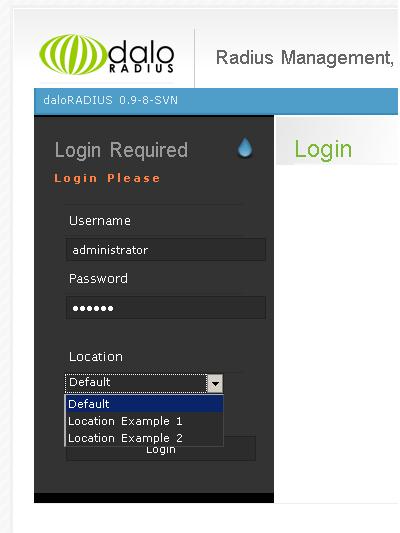
daloRADIUS new feature: locations

Known for his open source and JavaScript security initiatives, Liran Tal is an award-winning software developer, security researcher, and open source champion in the JavaScript community. He's an internationally recognized GitHub Star, acknowledged for his open source advocacy, and has received the OpenJS Foundation's Pathfinder for Security for his work on Node.js security. His contributions to developer security education include leading OWASP projects, building supply chain security tools, participation in CNCF and OpenSSF initiatives, and authoring books such as O'Reilly's Serverless Security. He leads the developer advocacy team at Snyk.io and is on a mission to empower developers with better application security skills.
Oct 23, 2008 ~ 2 min read
daloRADIUS new feature: locations
share this story on
I’ve been pushing in something new… it’s called Locations support.
The problem which adding Locations support targeted to solve is the issue which you may have several databases for your freeradius server (for example you’re hosting services for someone else or you would like to have multiple instances of a radius database for different hotspot locations) and you don’t want to install daloRADIUS platform (the web files) for each database (this is because the database information is statically configured one-time in a configuration file).
Hence, Locations are simply several configuration options for the available mysql databases on top of the must have default one.
To remind you, to configure your database connections for a mysql database where you radius server is stored you are setting the following options in library/daloradius.conf:
$configValues['CONFIG_DB_ENGINE'] = ‘mysql’;
$configValues['CONFIG_DB_HOST'] = ’127.0.0.1′;
$configValues['CONFIG_DB_USER'] = ‘root’;
$configValues['CONFIG_DB_PASS'] = ”;
$configValues['CONFIG_DB_NAME'] = ‘radius’;
The configuration directives that are now available to configure more locations than the default (the default location is always available) are declared as:
$configValues['CONFIG_LOCATIONS'] = array(
“Location Example 1″ => array(
“Engine” => “mysql”,
“Username” => “root”,
“Password” => “”,
“Database” => “radius”,
“Hostname” => “127.0.0.1″
),
“Location Example 2″ => array(
“Engine” => “mysql”,
“Username” => “db_usertest”,
“Password” => “db_passtest”,
“Database” => “test_db1″,
“Hostname” => “localhost”
)
);
You of course don’t need to know the syntax for it as it is provided by default in the daloradius.conf.php file. All that there is to it is simply to copy those “Location Example N” stanza and change the settings. As you probably have guessed, the format is variable in the left and the value in the right, so you just need to adjust the right text inside the double quotes to fit your setup.